


Find what converts
with A/B testing
Which copy resonates? Which design gets the click?
Popups deliver more when you see them in front of real visitors and compare results.
In Promolayer, duplicate a popup, line up the variants, and you're testing.
Impressions, click-through, and conversion rate are tracked automatically — and the winning variant can be copied to your live popup in one click.
Duplicate and edit — and the test
is already running
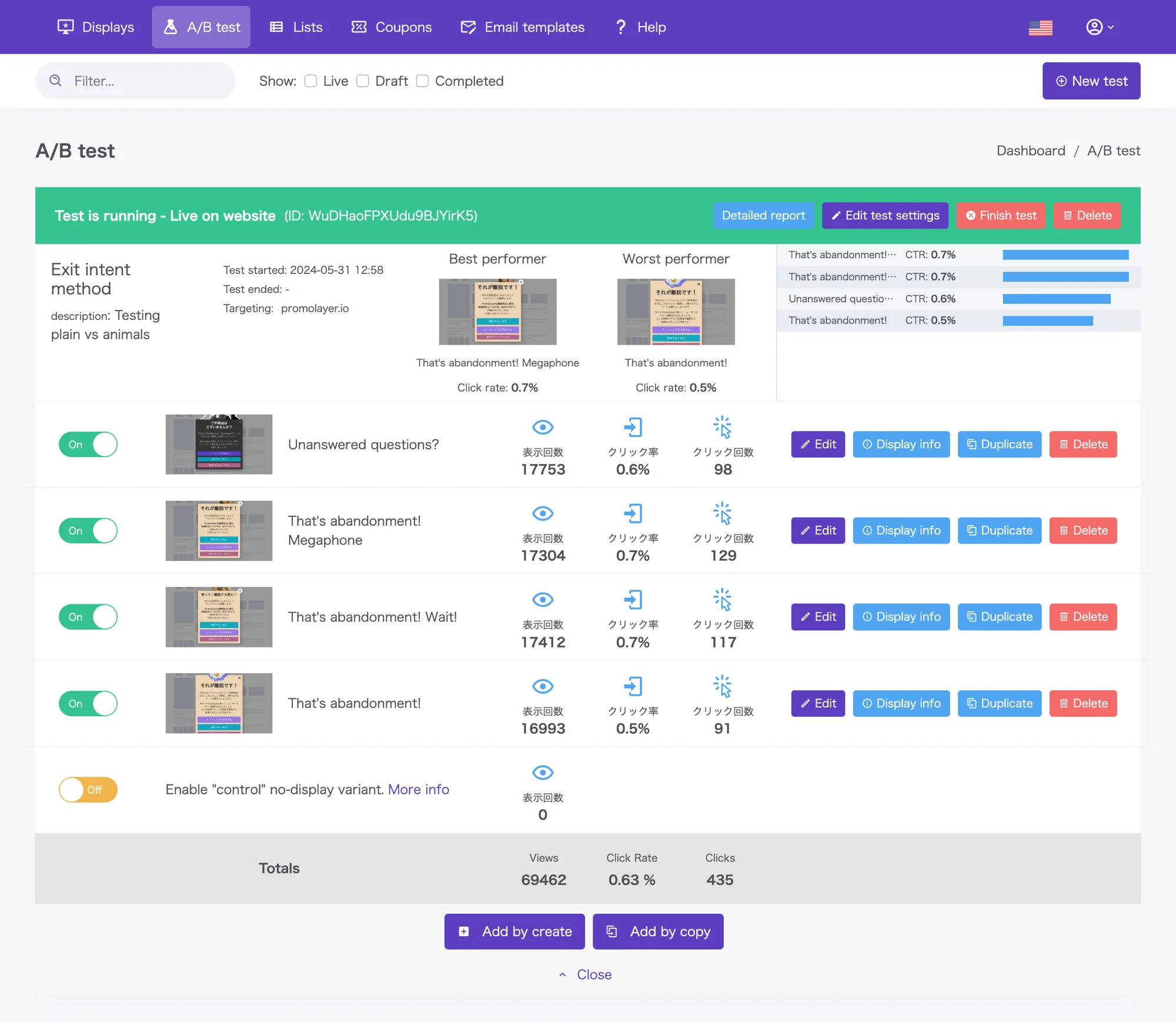
Duplicate the original popup with one click, edit only the copy, image, or color you want to compare, and place two or more side by side. The A/B test starts as soon as they’re live.
A “no popup” pattern can also be added with a single click — so you can measure how much running a popup at all contributes to your results.
If a variant is underperforming during the test, pause it from the dashboard without stopping the whole experiment. Traffic shifts to the popups that are working.
Same visitor, same popup on every visit
Visitors who have seen a popup once see the same popup again on return visits. That prevents skewed results from the same person seeing different variants on different visits, so even long-running tests stay reliable.
If a “no popup” control pattern is in play, the same logic keeps the comparison clean. Run-vs-don’t-run can be measured fairly in the data.
Visitors
100 people
Popup A
33%
Popup B
33%
Control
34%
No popup
Visitors who have seen a popup once see the same popup on return visits.
Visualize click and conversion rate
per popup
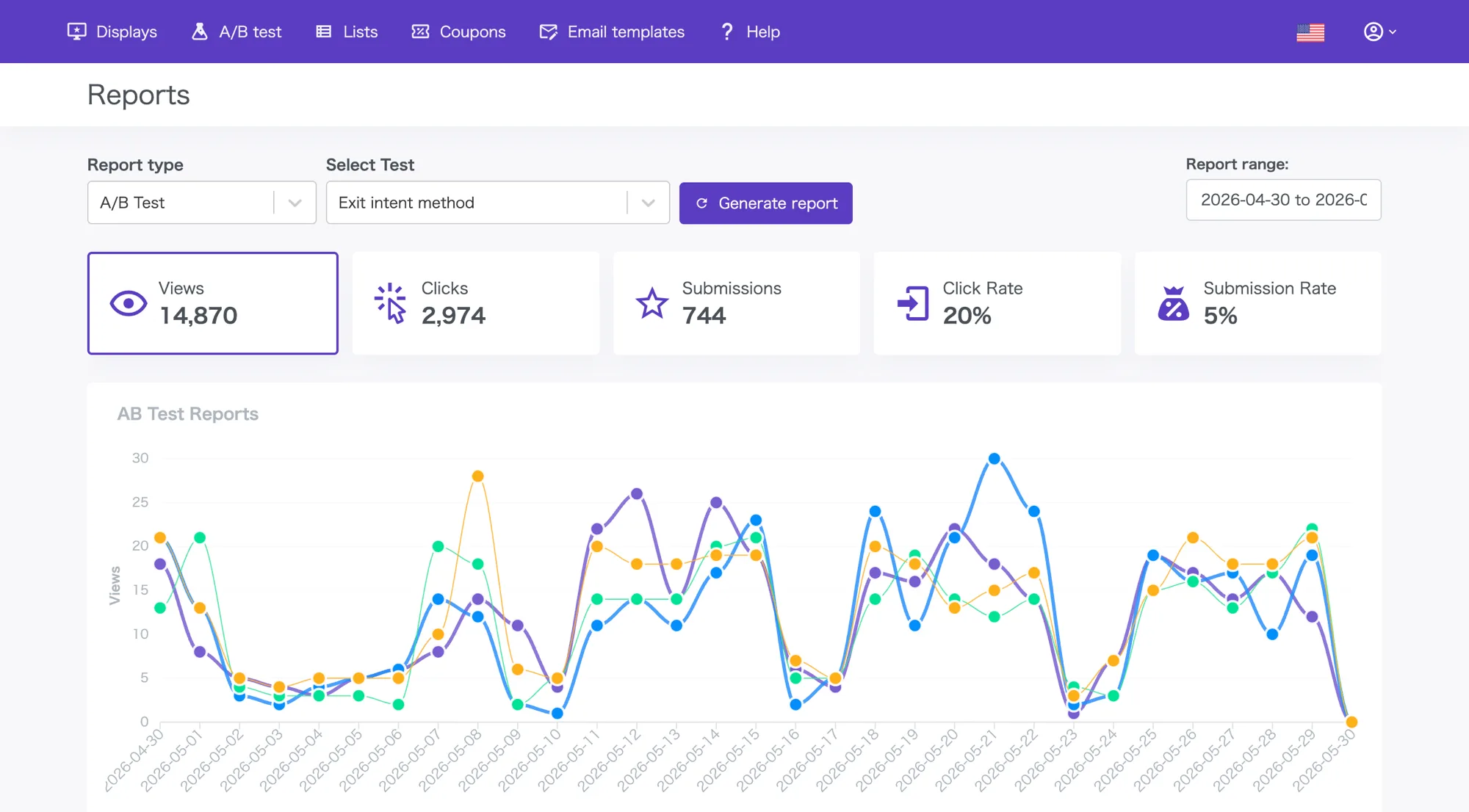
Compare impressions, clicks, and conversions plus the auto-calculated CTR and conversion rate side by side in a time-series chart and a per-popup table.
Variants are ranked by CTR and conversion rate, highlighting top and bottom performers. Decide quickly each day which popups to scale and which to replace. Per-page analysis is also supported.
Export the results as CSV and feed them straight into your internal analytics tools.
Available Plans
A/B testing is available on the Basic plan and above
The Free plan still lets you try every popup format and trigger.
Upgrade to a paid plan whenever you need A/B testing or advanced reports.
Frequently asked questions
Have another question? Reach us via the Help center.
Promolayer is a tool for designing and running on-site campaigns — popups, floating bars, spin-to-win, and more — without writing code. It covers what you need for conversion rate optimization (CRO): abandonment prevention, email list building, coupon delivery, and seasonal campaigns.
Built by a team that has worked on CRO for over a decade, Promolayer gives you the features that matter without dragging in unnecessary complexity. Detailed targeting, A/B testing, Google Analytics integration, gamification, and mobile-first design — all in one platform.
No coding skills are required. Pick a template, edit with point-and-click, set the targeting, and publish.
Most users get the hang of the builder in minutes. Marketing teams can create scenarios and iterate on them without waiting on engineering.
Promolayer is built with performance as a priority. The delivery script is lighter than a single image and uses minimal requests.
It also loads lazily — Promolayer only starts after your site has finished rendering. That keeps Core Web Vitals and SEO metrics intact, so you can run engagement campaigns without sacrificing speed.
Yes — Promolayer has a free forever plan with no credit card required. Try the core features first, and upgrade later only if you need more.
On paid plans there is no minimum commitment or cancellation fee. Upgrade, downgrade, or cancel anytime from the dashboard.
Promolayer works with Shopify, Wix, WordPress, and other major site builders and CMS platforms. Shopify and Wix install in one click from the app store; for other sites you paste the embed tag generated in the dashboard.
Google Tag Manager is also supported, so you can install without engineering help. On a custom site without a CMS, adding the tag code to your template is all it takes.
The direct sign-up version has no limit on the number of domains you can use. Agencies and production studios running multiple client sites are welcome. To keep client data separated, you can use Workspaces to split popups, reports, and tags per site.
The Shopify and Wix app versions are limited to one domain per install due to each platform's specifications. For multi-domain workflows, use the direct version.
Promolayer is designed with privacy regulations in mind. Consent checkboxes, privacy policy links, and other compliance features for contact collection are built in.
All traffic between the dashboard and delivery servers is encrypted over HTTPS, and collected contact data is stored on access-controlled servers.
The help center has guides for setup, troubleshooting, and integrations. You can also reach the Promolayer team directly via live chat from the dashboard.
Paid plans have no minimum contract length or cancellation fee. Start on the free plan, validate the impact, and upgrade when it makes sense. Plan changes are prorated automatically, so trying things out is low-friction.
Start engaging your visitors today.
Run popups, capture emails, and lift conversions — without writing code or hiring an agency.